
Getting started with Warp
For Vendies
The Borealis application templates available on Backstage come with Warp already configured. We recommend you start there rather than setting up Warp from scratch.
Warp design system packages
Warp for web consists of a few different packages:
| Package | Description |
|---|---|
| @warp-ds/fonts | The fonts used by our different brands and the CSS needed to set them up. |
| @warp-ds/css | The CSS versions of the Warp design system tokens and a CSS reset. |
| @warp-ds/elements | The canonical version of Warp components for web, implemented as web components to work with any frontend framework. Includes wrappers for React. |
You don't tecnically need to npm install any of them.
Borealis applications include these Warp packages on all pages through the shared HTML template.
If you are not using the Vend HTML template through Borealis for some reason, make sure this HTML snippet is included in your document <head>. Adjust the brand according to your environment.
<html>
  <head>
    <!-- Load the Warp elements as soon as possible to reduce the risk of flash of unstyled component (FOUC). -->
    <script type="module" src="https://assets.finn.no/pkg/@warp-ds/elements/~2/index.js" fetchpriority="high"></script>
    <link rel="stylesheet" href="https://assets.finn.no/pkg/@warp-ds/elements/~2/styles.css" fetchpriority="high">
    <!-- Load the fonts and tokens for your brand. -->
    <link rel="stylesheet" href="https://assets.finn.no/pkg/@warp-ds/fonts/~1/finn-no.css" />
    <link rel="stylesheet" href="https://assets.finn.no/pkg/@warp-ds/css/~v~2/tokens/finn-no.css" />
    <!-- Include the Warp CSS reset. -->
    <link rel="stylesheet" href="https://assets.finn.no/pkg/@warp-ds/css/~2/resets.css" />
  </head>
  <!-- Apply the Warp component cloaking to reduce the risk of FOUC. -->
  <body class="warp-cloak">
  </body>
</html>
Other Warp packages
A handful of other Warp packages serve different needs, or have been replaced by packages in the list above:
| Package | Description |
|---|---|
| @warp-ds/uno | Warp preset for UnoCSS, an atomic CSS engine. |
| @warp-ds/react | A direct-in-React implementation of some Warp components. No longer actively maintained. Use @warp-ds/elements React wrappers instead. |
| @warp-ds/vue | A direct-in-Vue implementation of some Warp components. No longer actively maintained. Use @warp-ds/elements components instead. |
| @warp-ds/components | A React 19 implementation of some Warp components. No longer actively maintained. Use @warp-ds/elements React wrappers instead. |
Editor integration
For improved integration with your editor, install the Warp packages as development dependencies and set up these extensions (or equivalent for your editor):
- Web Components Language Server for hover info and code completion for Warp components.
- CSS Variable Autocomplete to get InstelliSense for CSS variables inside stylesheets.
- UnoCSS for hover info and code completion for Warp CSS classes.
- Lit for syntax highlighting and code completion in Lit components.
For improved editor integration you should have Warp packages installed, so the tooling can process and show Warp documentation.
npm install @warp-ds/elementsIn your tsconfig file, add Warp Elements to compiler options:
{
  "compilerOptions": {
    "types": ["@warp-ds/elements"]
  }
}
The Web Components Language Server will automatically provide documentation on hover and code completions whenever you use Warp Elements, even in other frameworks such as React.
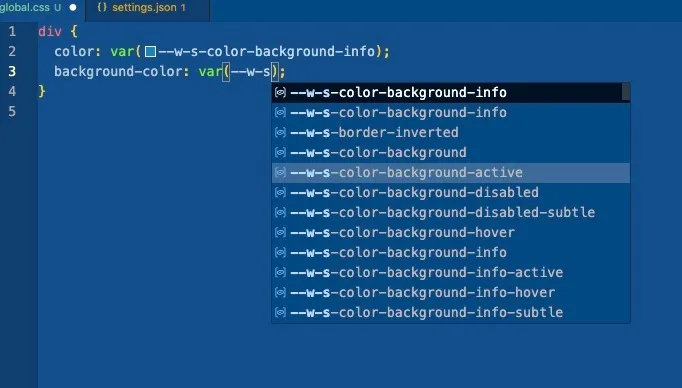
Configuration for CSS variables IntelliSense
Once you add brand token files to lookupFiles you should see Warp CSS variables as code suggestions when writing CSS var(--w-s).
// settings.json
{
  "cssVariables.lookupFiles": [
    "**/*.css",
    "**/*.scss",
    "**/*.sass",
    "**/*.less",
    "node_modules/@warp-ds/css/dist/tokens/finn-no.css"
 ]
}
Choose an approach to CSS
Warp includes a set of ready made components, but you will still be writing a lot of CSS, especially for laying out the content on the page.
How you want to manage your CSS is up to you. If you have no strong preference, Object oriented CSS (OOCSS) in plain CSS files using Warp CSS variables is a safe default with low risk of lock-in.
TIP
Warp started out using Atomic CSS internally, but is gradually replacing it for a style closer to OOCSS.
Atomic CSS
Warp started out being built with UnoCSS, an atomic CSS engine.
Atomic CSS is the approach to CSS architecture that favors small, single-purpose classes with names based on visual function.
Examples of atomic CSS classes are p-16 and s-bg-primary-subtle. The classes do one thing each:
- Set
padding: 1.6rem(we use a CSS hack in Vend so1px == 0.1rem) - Set
background-colorto a subtle variant of the brand's primary color.
<aside class="p-16 s-bg-primary-subtle"></aside>Object oriented CSS, Block Element modifier
While you are welcome to use the Atomic CSS architecture in your applications, you don't have to. Other popular architectures are Block Element Modifier (BEM) and Object Oriented CSS (OOCSS).
In these architectures CSS classes lean more toward a semantic class name that includes all relevant styles. Of the two, OOCSS is less strict in its conventions.
.callout {
  padding: 1.6rem;
  background-color: var(--w-s-color-background-subtle);
}<aside class="callout"></aside>TIP
Internally @warp-ds/elements uses a style closer to this one, instead of UnoCSS.
Using Warp CSS variables
All Warp styles come from a style dictionary shared between Figma and code. This is essentially a list of names and their values (color codes, pixel sizes).
Entries in this style dictionary are available globally as CSS variables.
You can use them in any CSS file, even plain CSS with no build tools. This approach to CSS is a great way to reduce your dependencies and avoid lock-in.
.callout {
  padding: 1.6rem;
  background-color: var(--w-s-color-background-subtle);
}
Additional setup needed for Atomic CSS
With the OOCSS or BEM approaches all you really need is a .css file and you are good to go. Most bundlers let you import CSS files to have them included in the built output.
For Atomic CSS the setup is a bit more involved.
First you will need to install UnoCSS, the Warp UnoCSS preset and the "safelist" of classes UnoCSS can assume is always present (and so can be skipped in the compiled output).
npm install --save-dev unocss @warp-ds/css @warp-ds/unoUnoCSS needs a uno.config.ts file to work properly. Here is a minimal config that includes Warp. Refer to the UnoCSS documentation for other options and possible integrations, such as what files to include in scans, and bundler plugins.
// uno.config.ts
// @ts-expect-error
import { presetWarp } from "@warp-ds/uno";
// @ts-expect-error
import { classes } from "@warp-ds/css/component-classes/classes";
import { defineConfig } from "unocss";

export default defineConfig({
  presets: [
    presetWarp({
      externalClasses: classes,
      skipResets: true,
    }),
  ],
});
Use Warp web components
These components can be used in any framework and is the only set of Warp components for web that is actively maintained.
With the setup from the introduction, Warp web components are available globally and can be freely used in your application.
<w-breadcrumbs aria-label="You are here">
  <w-breadcrumb-item href="/marketplace">Marketplace</w-breadcrumb-item>
  <w-breadcrumb-item href="/marketplace/furniture">Furniture</w-breadcrumb-item>
  <w-breadcrumb-item current-page>Sofas</w-breadcrumb-item>
</w-breadcrumbs>
Don't import these components in your own code
Perhaps counterintuitively you should not import the components in your own application code. For one, the component code is already shipped to browsers so you don't need to include it in your bundle. Secondly, if you server-side render Lit code you risk seeing Lit hydration errors (where the server version does not match the browser version), in which case Lit will render two instances of the component.
Warp components in React
Use Warp Elements (web components) in React apps. The React-specific @warp-ds/react package is deprecated.
React apps should use the React wrappers provided by @warp-ds/elements to avoid some hydration mismatch errors when using server-side rendering.
Install the package to use the wrappers:
npm install @warp-ds/elementsUsing Elements wrappers in React components
Import each wrapper from @warp-ds/elements/react and use it in JSX:
import { Breadcrumbs, BreadcrumbItem } from '@warp-ds/elements/react';

export default function Example() {
  return (
    <Breadcrumbs aria-label="You are here">
      <BreadcrumbItem href="/marketplace">Marketplace</BreadcrumbItem>
      <BreadcrumbItem href="/marketplace/furniture">Furniture</BreadcrumbItem>
      <BreadcrumbItem current-page>Sofas</BreadcrumbItem>
    </Breadcrumbs>
  );
}
See each component's Elements documentation for its attributes, properties and events.
Warp components in Vue
Use Warp Elements (web components) in Vue apps. The Vue-specific @warp-ds/vue package is deprecated.
Configure Vue to treat tags starting with w- as custom elements. For a Vue 3 app using Vite, add isCustomElement to your existing Vue plugin configuration in vite.config.js:
import { defineConfig } from 'vite';
import vue from '@vitejs/plugin-vue';

export default defineConfig({
  plugins: [
    vue({
      template: {
        compilerOptions: {
          isCustomElement: (tag) => tag.startsWith('w-'),
        },
      },
    }),
  ],
});
For other build tools, see Vue's custom element configuration.
Using Elements components in Vue components
Use Warp elements directly in Vue templates. No component imports or app.use() calls are needed.
<template>
  <w-breadcrumbs aria-label="You are here">
    <w-breadcrumb-item href="/marketplace">Marketplace</w-breadcrumb-item>
    <w-breadcrumb-item href="/marketplace/furniture">Furniture</w-breadcrumb-item>
    <w-breadcrumb-item current-page>Sofas</w-breadcrumb-item>
  </w-breadcrumbs>
</template>
See each component's Elements documentation for its attributes, properties and events.