
Link - Styling
Link component to use when creating links that look like buttons.
AndroidreleasedElementsreleasedReact 19released
Layout and spacing
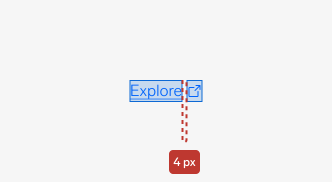
Ensure a 4px spacing between the text link and the trailing icon.
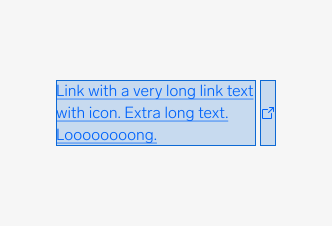
When the link text exceeds its container, it should wrap to the next line. The icon remains vertically aligned in the centre of its container.
Color
Text/Link is the default color token available for links. Alternatively, you can use Text/Default on navigation elements, such as header and footer.
| Element | Figma token |
|---|---|
| Text | Semantic/Typography/Text/Link |
| Text (navigation only) | Semantic/Typography/Text/Default |
| Icon | Semantic/Color/Icon/Primary |
Typography and sizing
There are four sizes available for links: preamble, body, caption and detail. Sizing applies to both standalone and inline links. Inline link sizes should match the type size of the text it is inline with. Standalone link sizes should match the default body copy size of the page.
| Text style | Figma token | Font-size | Line-height | Icon size | Example |
|---|---|---|---|---|---|
| Preamble Link | Semantic/Typography/Preamble | 20px | 26px | 24px |  |
| Body Link | Semantic/Typography/Body | 16px | 22px | 16px |  |
| Caption Link | Semantic/Typography/Caption | 14px | 18px | 16px |  |
| Detail Link | Semantic/Typography/Detail | 12px | 16px | – |  |
Questions?
Feel free to ask any questions on usage in the Warp DS Slack channel: #warp-design-system