
Slider - Overview
Sliders allow users to adjust a single value within a defined range by moving a handle along a horizontal track.
AndroidreleasedElementsreleasediOSreleasedReactreleasedReact 19releasedVuereleased
Example
html
<form id="audio">
  <w-slider label="Volume" min="0" max="100">
    <w-slider-thumb name="volume"></w-slider-thumb>
  </w-slider>
</form>
Overview
Sliders are best suited for quickly setting a value within a designated range. They offer an intuitive way to adjust settings like volume, price filters, or relative distances.
Sliders are available in two different variants:
- Single (documented here)
- Range slider
Anatomy
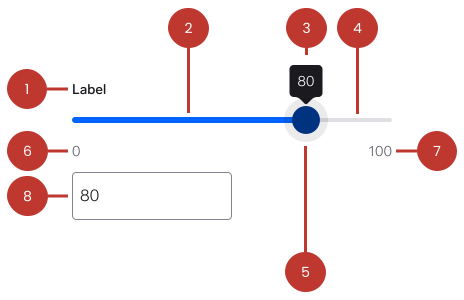
- Label (optional): Describes what the slider controls or adjusts.
- Filled/active track: Visualises the selected portion of the slider range up to the selected value.
- Tooltip: Displays the current value while dragging the handle, providing immediate feedback.
- Track: Represents the full range of available selectable values.
- Handle: Movable indicator used to select a value along the track.
- Minimum range label (optional): Indicates the lowest selectable value and visually defines the start of the range.
- Maximum range label (optional): Indicates the highest selectable value and visually defines the end of the range.
- Value input/text field (optional): Displays the current selected value by the handle and allows manual entry.
- Input suffix (optional): Provides contextual clarification for values when their meaning is ambiguous, such as currency or measurement units.
Questions?
Feel free to ask any questions on usage in the Warp DS Slack channel: #warp-design-system